
IMPORTANT: If the file in the Google Shared Drive is private; that is, it should not be available to the public, then the Content Privacy setting of the entire page must be Restricted.
If you are sharing a document that is on the Google Shared Drive, enter the URL and a description.
To link to a document in your group's Google Shared Drive:
Step 1. Open the Shared Drive folder and find the file you want to upload. Highlight the file. Click on the three vertical dots at the end of the row. If you see four icons to the left of the vertical dots. Click on the icon with the human shape and plus sign.
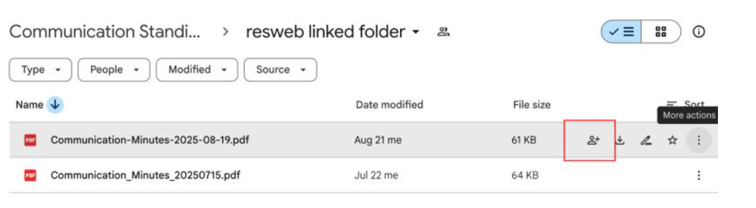
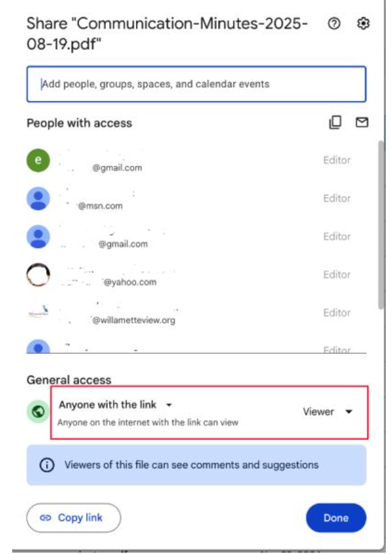
You will see a pop-up window similar to step 2.
Step 2. Make sure that the block below General access has Anyone with the link and option set to Viewer. Click on the Copy link button. Click on the Done button.
Return to the resident website.
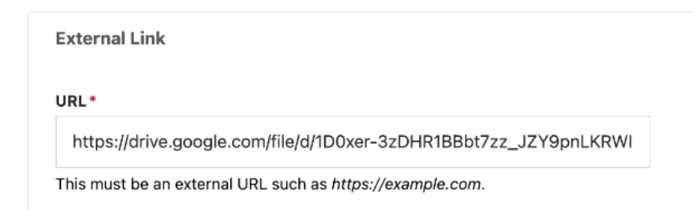
Step 3. Place your cursor in the URL field under External Link and paste the link from your clipboard. It should look similar to the image below.
Step 4. Link Text: Enter a short description, for example the title of the document, How to Schedule a Meeting Room.
as of: 5-25-2026